Home › Dell 8FC8
Dell 8FC8 Unlock: fast and secure BIOS password removal
Your Dell shows a code ending in 8FC8 and the BIOS is locked? I remove the lock safely via hardware flash – no risky online tools.
What is the Dell 8FC8 error code?
Newer Dell systems with an administrator password show a code in the format ServiceTag-8FC8 (e.g. 1A2B3C4-8FC8). For this suffix – as well as 3FE2 – there are no working master password generators. The reliable fix is to read the BIOS chip, remove the lock and reprogram it.
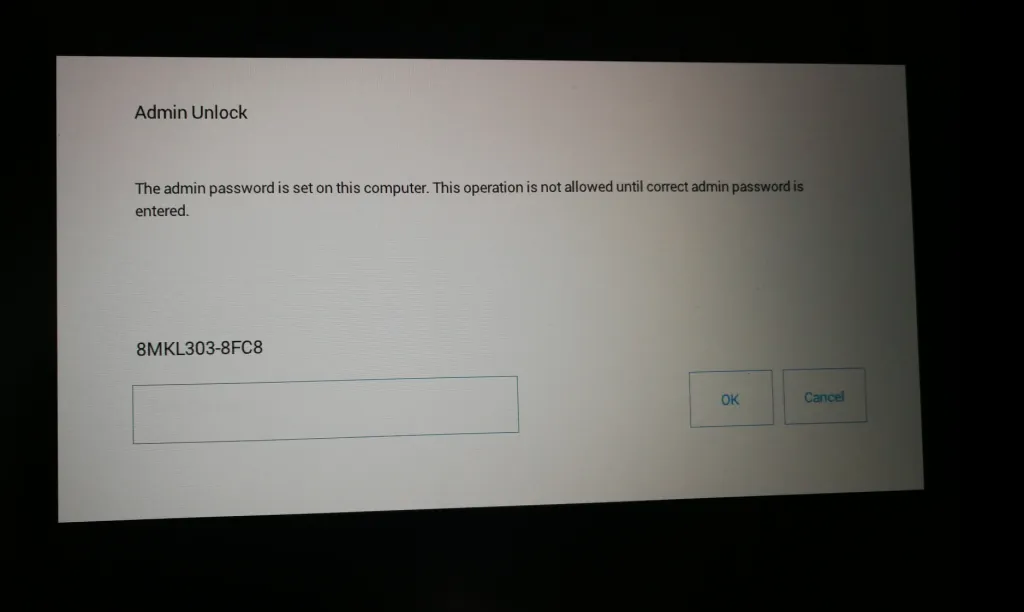
Affected Dell models (selection)
Dell Latitude 5300Dell Latitude 5400Dell Latitude 5500Dell Latitude 5501Dell Latitude 5510Dell Latitude 5520Dell Latitude 7400Dell Latitude 7410Dell Precision 5570Dell Precision 7540Dell OptiPlex 5080Dell OptiPlex 5090
Your model isn't listed? See all supported models or just ask.
My service
- Secure Dell 8FC8 unlock via hardware flash and specialised software
- No risky online tools or “generators”
- Fast processing and secure return shipping
- Mail-in service – based in Germany
Prices
Video: how the 8FC8 unlock works
Short version: Dell Latitude 7400
How the repair order works
- Request: via Instagram @ravescanner or e-mail lbepro@airich.de. You'll receive the shipping address.
- Repair order: download the PDF (German), fill it in, tick your option and sign.
- Ship: send the device well packed together with the order.
- Tracking number: send it to me via Instagram or e-mail.
Own devices only – no stolen or found devices. No WhatsApp, no phone.
Do it yourself?
With a CH341A programmer you can read the BIOS chip yourself: Read BIOS with CH341A programmer.